
Asigno is a COTS product, perpetually licensed at the organization level. It is built entirely on open-source technologies and designed to streamline workflow interactions with internal users, external users and institutional partners. The platform is already used in many projects of this kind and substantially reduces the risk of project failure.
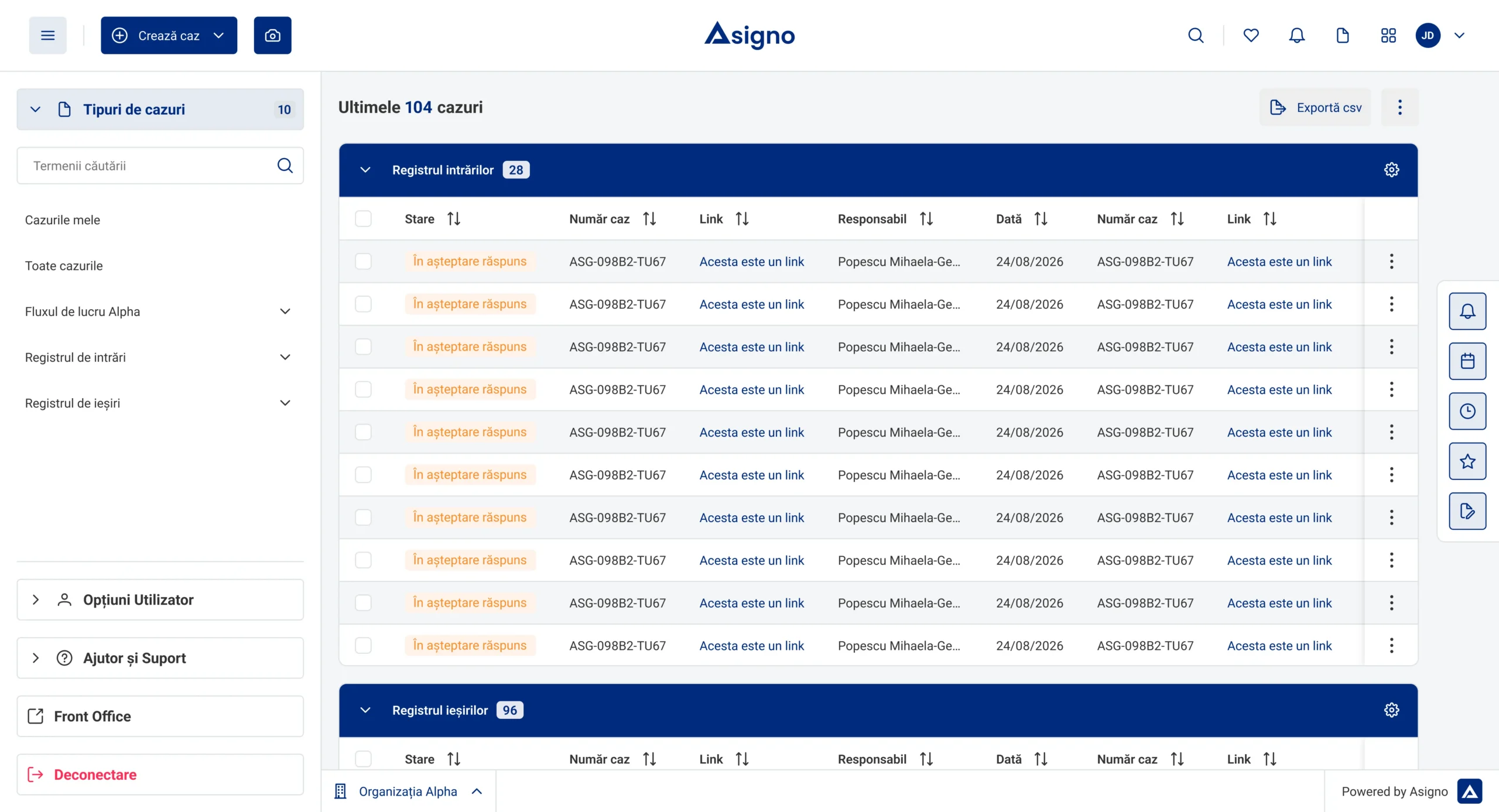
Overview of the platform
Given the specificity of each company, the different analysis and design requirements, the implications for the project infrastructure, and the different categories of users and institutional partners involved, Asigno represents a very suitable management solution for projects, both public and private, of any size.
Structure
Asigno has three components that work on the same data: the backoffice for the internal team, the portal for customers and citizens, and the mobile application. Each user sees the appropriate interface for their role, and the information remains consistent from one channel to the next.
Asigno includes a robust interface dedicated to the general administration and internal flows of the institution within the backoffice, along with separate interfaces for clients and citizens, both in authenticated mode and in the public mode.
This structure allows for easy and efficient access to information, services, and communication for all users, providing them with an intuitive and enjoyable experience.
Asigno includes a dedicated mobile application so that users can access the system’s information, services, and functionalities on their mobile devices, regardless of location or time — with the same features as the web version.
Methodology
Each Asigno implementation follows a structured process, from needs analysis to post-launch support. We use methodologies such as PM2 and Agile Scrum, taking into account deadlines, costs, and organizational constraints, and the installation method is chosen based on the security requirements of each institution.
We have extensive experience in implementing integrated IT systems. We take into account objectives, deadlines, costs, and organizational constraints, and the PM2 methodology is adapted to each client and project.
We specialize in addressing the needs of public and private organizations across all fields. We maintain libraries of business-domain projects, reused together with the BABOK, BPMN 2, RUP and TOGAF methodologies.
We are experienced in the design and development of large-scale web and mobile applications and BPM platforms. We use open source technologies, modern infrastructure, and established architectures, with the Scrum Agile and PM2 Agile methodologies.
Organizations can configure and manage cloud resources according to their specific requirements, ensuring that all aspects of security, compliance, and performance are met to the highest standards.
The advantage of reduced costs, eliminating the expenses of purchasing, maintaining, and updating traditional hardware, plus simplified management through integrated tools and services.
For organizations that prefer full control over the platform, data, and IT infrastructure. It allows for deep customization and is ideal for entities subject to strict security regulations.
Installation options
The same platform runs identically in all three scenarios. The choice is made based on internal security policies, the infrastructure budget, and the regulations applicable to your field.
Asigno stands out for its remarkable flexibility in installation options, offering solutions adaptable to the diverse needs of organizations. It is not three different products, but the same product delivered in three ways, with the same functionality and the same perpetual licensing model.
In the Private Cloud, the organization configures and manages the resources according to its own requirements, with full control over security, compliance, and performance. The Public Cloud reduces costs by eliminating the expenses associated with the purchase, maintenance, and updating of traditional hardware, and simplifies management through integrated tools and services.
The On-Premise variant remains suitable for institutions that require full control over the platform, data, and IT infrastructure — it allows for deep customization and meets strict security requirements. Regardless of the option, the containerized architecture and Kubernetes orchestration ensure scalability, high availability, and CI/CD processes for updates without interruptions.
Total control over the platform, data and infrastructure, for strict security regulations.
Reduced costs, no hardware investment, and simplified management through integrated services.
Control over the configuration of resources, with security, compliance, and performance at the highest standards.
Context
Low-code development simplifies software creation by providing a visual environment where users can drag and drop components to quickly build applications. It democratizes development, allowing both technical and non-technical users to participate in creating digital solutions.
Low-code development accelerates application delivery, promotes collaboration, and improves agility. With reduced coding requirements, teams can quickly iterate, adapt to changing requirements, and stay ahead of the competition.
Suitable for internal tools such as project management systems, as well as for applications intended for customers. It is ideal for prototyping and concept projects, facilitating digital transformation.
While low-code development offers efficiency, organizations must consider performance, scalability, and vendor lock-in. Training and appropriate support are essential to maximize benefits.
Explore
What an organization actually gains after implementing Asigno: faster processes, decisions based on data, less repetitive work, and simpler collaboration between the team, customers, and partners, from any device.
Users can access the app and relevant information from anywhere and on any device with an internet connection, through a simple and flexible experience.
External and internal portals provide a centralized environment for communication and collaboration between customers, partners, and team members, accelerating processes.
The BPM engine facilitates the automation of repetitive tasks and processes, eliminating human errors and improving operational efficiency.
The integrated Business Intelligence component enables in-depth data analysis, providing relevant insights and custom reports.
Through distributed case management and the BPM engine, the platform optimizes workflows and business processes, reducing the time and resources needed to complete tasks.
Context
A look at how the platform is built and what it can do. On the left, the architectural principles that ensure scalability, security, and interoperability; on the right, the main functionalities that teams use daily.
Asigno is a distributed case management IT solution. Case management allows users to create, update, and track individual or group cases, including stages, documents, and interactions with customers or other involved parties.
The solution integrates a Business Intelligence component for customized reports and statistical analyses, a BPM engine based on Camunda or Bonita for modeling workflow processes without advanced programming knowledge, an External Portal for interaction with the institution, and an Internal Portal for internal users.
Stack
What an organization actually gains after implementing Asigno: faster processes, decisions based on data, less repetitive work, and simpler collaboration between the team, customers, and partners, from any device.
The deployment architecture is designed for scalability and high availability, based on a distributed and containerized architecture managed by Kubernetes. Auto-scaling ensures dynamic resource allocation, optimizing costs and efficiency, while containers facilitate the isolation of components and CI/CD processes.
Asigno integrates Elasticsearch and OpenSearch for search and analysis, APM and Logstash for monitoring, Fscrawler for document indexing, Kibana for visualization, Bonita BPM and Camunda for processes, JasperReports for reports, Apache Kafka for messaging, Keycloak for identity, ZooKeeper for coordination, and PostgreSQL for databases.
Asigno integrates with COTS solutions such as Oracle data management systems and Google Auth authentication services. The compatibility ensures scalability, improved security, and adaptability to the specific needs of businesses.
F.A.Q.
The questions we get most often about process modeling, forms and integrations.
Integration is set up by adding a new organization in the administration console and specifying the workflows used for the integration. Information is exchanged via ebMS 2.0 messaging.
The tasks assigned to the current account are shown in the “My Cases” menu.
Electronic signing can be done by selecting one or more documents from the list of tasks for signing.
Data entry forms are modeled in Asigno Studio. The tool lets you define the storage data model and the modules for editing or displaying information, using predefined drag-and-drop widgets.
Business processes are modeled graphically with BPMN diagrams in Asigno Studio. Drag-and-drop elements include human and automated tasks, decision gateways for splitting and merging flows, and subprocesses that can be reused later.